Thursday, 10 March 2016

Cut Out Stencil Spray


Objective
To improve handmade skills
To incorporate handmade objects into digital work
To broaden the range of development and experimentation available.

Task
Create a sprayed portrait to work into a magazine cover.
Follow the tutorials below on how to create a stencil spray image. 
HERE is a link to a stencil pinterest board

Presentation
Screenshot and photograph, post to blog. Annotate and highlight key terms.

Checklist for assessment
Original photo, work in progress shots (analogue and Photoshop), final image, annotations.

Deadline
TBC


Get headphones, get comfy and concentrate...

Tuesday, 8 March 2016

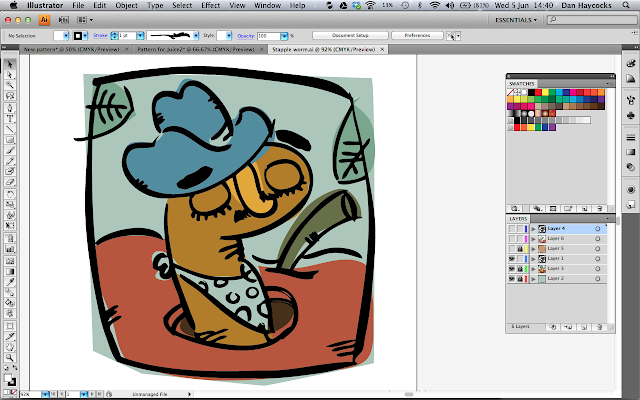
Illustrator Pencil Tool


Objective
To learn another technique for making images.
To begin an introduction into Adobe Illustrator.

Task

  • Choose another page from your book and find an object or scene that represents your lyric.
  • Draw in pencil in on scrap paper, approximately A6 size.
  • Using a lightbox, 'ink' your drawing using as few lines as you can. Attempt to create lines that vary from thin to thick to thin. Don't 'block-in' larger areas - leave that to Illustrator.
  • Ink 4 or more until you get a great one.
  • Scan and 'place' the scanned drawing into Illustrator. 
  • Then run through the tutorial below... make sure you take and post a few interesting screenshots along the way.

Presentation
Screen shots of WIP, photos of drawings, final, placed in InDesgin. 

Time needed
4 lessons

Deadline
tbc


Start tutorial at 2.39.  That's when I stop waffling.


Tuesday, 1 March 2016

Cyanotypes


Objective
To utilise another process for creating images
To attempt an impressionistic, poetic montage. 
Montage = the process and result of making a composite image by cutting and joining a number of other photographs, images, textures and text.
To play with a process that has been around since 1842.

Task
Look through your pages and choose a scene that you wish to illustrate.
Attempt to choose something that isn't just a single image. Instead, you are creating a montage.
Collect images, photographs, textures and text that relate to a single page or consider creating a rectangle (2 squares next to each other) that could be used for your cover. If this is the case, you could include elements from throughout the song.
Create an A4 document in Photoshop and paste your images into it.

Then i'll talk you through the process. 

Feel free to experiment and try more than one attempt.

You will be graded on
Inventiveness when utilising process. 
i.e. being able to consider what the process can achieve andtaking advantage of it.

Time needed
3 hrs

Deadline
?

Tuesday, 9 February 2016

Pen Portrait 2


James Gulliver Hancock. HERE

Objective
To complete one of the images for the lyrics book.
To increase skills in digital and  traditional processes—custom colour palettes / colouring line only / blending modes / making patterns / pattern stamp tool.

Task
Scan your drawing. Forgotten? See below—watch until 1.48.
Complete the tutorials below in order

Presentation
Take whole screen shots of process / post with your final design.  


Deadline
tbc


Wednesday, 3 February 2016

Pen Portrait 1

Objective
To improve line drawing skills.
To create a single illustration for the song lyrics book.
Task
- Choose a page and choose an image that you wish to use. A portrait would be best for this. If not then use an object from your list.
- Print it off in black and white—A5 size but on an A4 sheet
- Using layout paper (or printer paper if you are on a lightbox) trace the image.
- Then have another go—but do it freehand.
- Look again at the image above—the artist has drawn only the lines, block tone and details—no shading.
- Use a dark felt tip for the thick lines and a biro, fineliner or pencil.

Presentation
Photograph (preferred) or scan to your blog.

Checklist for assessment
tbc

Deadline
tbc

Wednesday, 27 January 2016

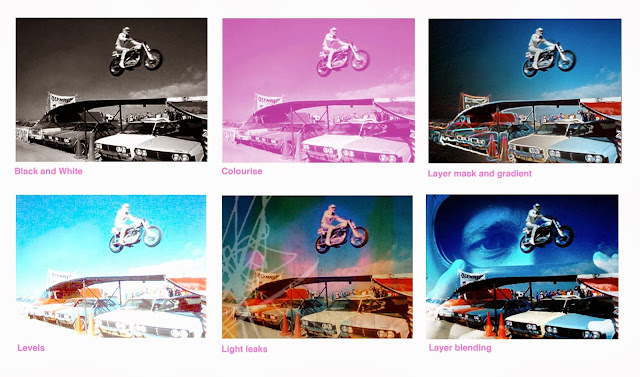
Six Basic Photo Edits in Photoshop


Objective
To improve your skills when editing photos in Photoshop.

Task
Look to your book plan and choose another image. Using some sourced from the web. Complete the six 'basic photo edit' tutorials below.

Presentation

In one post, put jpegs of your six finished Photoshop examples. State underneath each, which process was used.

Checklist for assessment
Examples should be visually interesting and not just done for the sake of getting them on your blog.

Deadline
tbc


Tuesday, 26 January 2016

Post that should be on your blog...


Take a look again at The Perfect Blog to check that you are presenting your work the best you can.
Please ensure that the following work is posted to your course blog. 

  • Page 1 - Photoshop editing 
  • Page 1 - page of drawings / paintings 
  • Page 1 - page of photographs 
  • Page planning 
  • Annotated lyrics 
  • (Xmas card - Final Jpeg) Not compulsory 
  • Type Poster - Final Jpeg 
  • Type Poster - Work in progress (full-screen shots of Photoshop) 
  • Type Poster - Drafting (photos of sketchbook pages) 
  • Type Poster - Research (screenshot of Pinboard) 
  • Business Card - Final design (Photographs) 
  • Business Card - Work in Progress (screenshots) 
  • Business Card - Drafting (photos of sketchbook) 
  • Business Card - Research (screenshot of Pinboard)